🩺
PrestaShop 1.6 – 8.x

ModKodes

Stop wondering what your modules left behind. ModKodes watches every install, upgrade, and uninstall — and tells you the truth with real evidence, not a naming guess.

No account required to download · One ZIP — trial or licensed · Upgrade without reinstalling

🔓
Unlimited Trial

Download and use forever — no expiry clock

3 Free Events

Try 3 full install/upgrade/uninstall events before committing

🔑
Buy a License Key

One purchase unlocks backup, restore and full uninstall reporting

📦
No Reinstallation

Paste the key into the installed module to upgrade instantly

Overview

Every Store Accumulates
Invisible Clutter

A module gets uninstalled — but its database tables stay. Its configuration keys stay. Its admin menu entries stay. PrestaShop says "uninstalled successfully" and moves on. ModKodes doesn't. It takes a before-and-after snapshot of every lifecycle event and tells you exactly what didn't clean up — with verified evidence, not a naming guess.

🔍

Verified, Not Guessed

ModKodes watched the module install, so every leftover finding comes with direct evidence — not a pattern match on folder names.

🩹

Immediate Health Check

Runs a structural scan on day one — orphaned hooks, missing files, disabled modules still firing. No monitoring history required.

🛡️

Safe by Design

Monitoring and integrity checks are read-only. Cleanup only happens when you explicitly confirm it — and the Full version backs up first.
Features

What's Included

Automatic Lifecycle Monitoring

  • Hooks into every module install, upgrade and uninstall automatically
  • Before-and-after snapshots with no manual steps
  • Searchable module registry, paginated at 15 per page

Store Health Check

  • Orphaned hook registrations with one-click fix
  • Orphaned admin tabs and missing module files
  • Disabled modules still firing on hooks

Per-Module Integrity Checks

  • Override conflicts between installed modules
  • Missing uninstall cleanup detection
  • Unusual code patterns and external service call audit

Safe Cleanup (Licensed)

  • Automatic backup before every cleanup delete
  • One-click restore if you change your mind
  • Uninstall directly from ModKodes with clean/partial/failed reporting
See It In Action

Screenshots

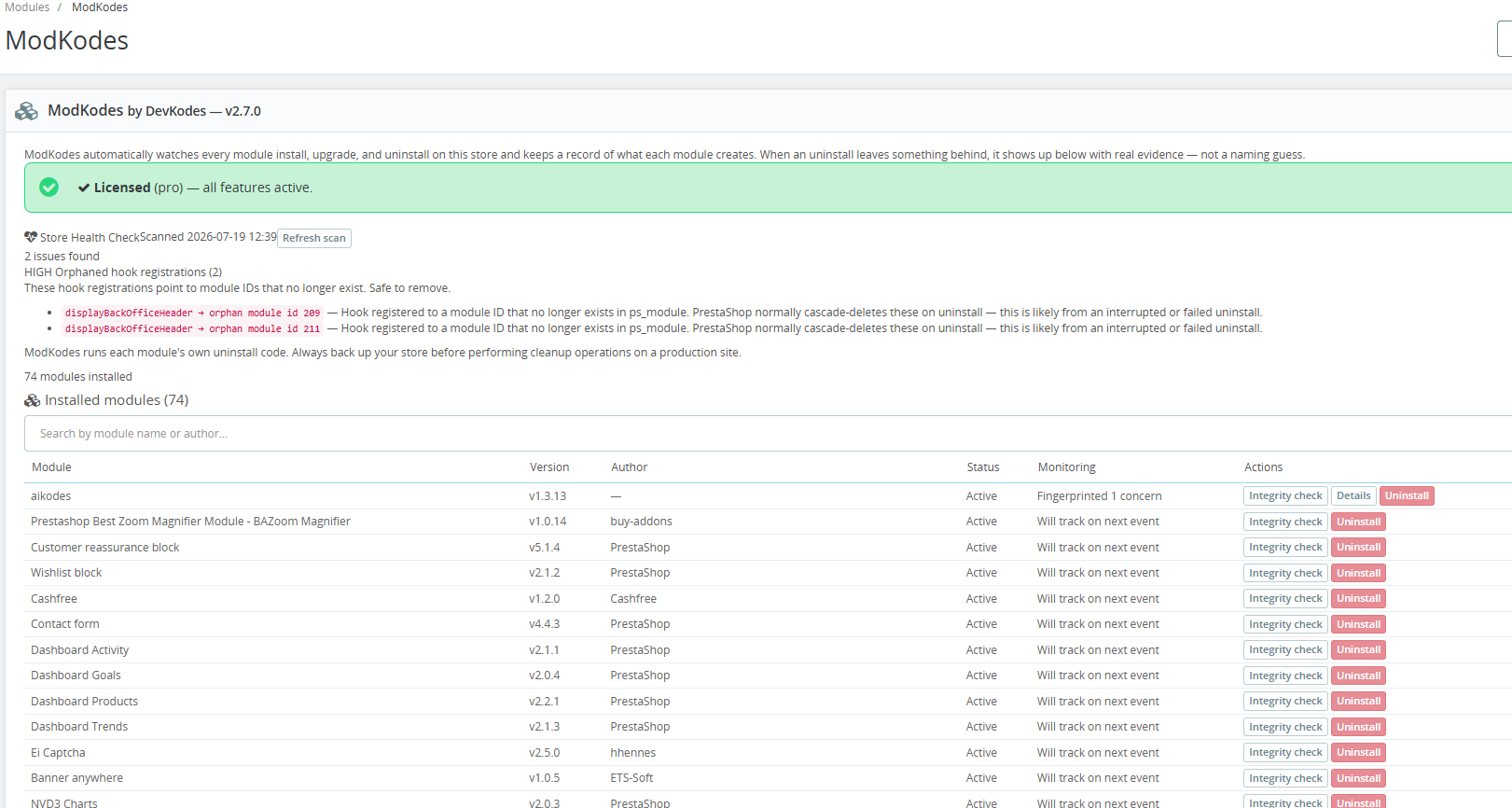
ModKodes admin dashboard showing module registry and store health check

ADMIN DASHBOARD & REGISTRY

ModKodes integrity check showing concerns and external call audit

INTEGRITY CHECK & CONCERNS

ModKodes uninstall confirmation dialog

SAFE UNINSTALL FLOW

Trial vs Licensed

What the License Unlocks

FeatureFree TrialLicensed — $49
Module registry with search
Store Health Check with one-click fixes
Per-module integrity checks
Leftover detection after uninstall✓ (3 events)✓ Unlimited
Backup before every cleanup delete
One-click restore
Uninstall directly from ModKodes
Partial/failed uninstall report
📚

Documentation

Full installation guide, configuration walkthrough and troubleshooting reference.

View Documentation →
📋

Changelog

Every version, every fix.

View Changelog →
FAQ

Common Questions

Does ModKodes delete anything automatically?+
Never. Every finding is surfaced for your review — deletion only happens when you explicitly confirm it, and the Licensed version always backs up first.
Is it safe to run on a live production store?+
Yes. Monitoring and integrity checks are entirely read-only. Cleanup actions are the only thing that modifies your store, and those always require explicit confirmation.
What about modules installed before ModKodes?+
They show as "Will track on next event" until their next install, upgrade or uninstall. The Store Health Check still finds structural issues on day one regardless of monitoring history.
Do I need to reinstall after buying a license?+
No. Same ZIP for trial and licensed — paste your license key into the module's settings and it upgrades instantly without reinstallation.
What if an uninstall fails partway through?+
ModKodes captures a post-failure snapshot and tells you exactly what was and wasn't cleaned up before the failure. This partial-state report is a Licensed-only feature.
How does the license work?+
One key per domain. If our license server is briefly unreachable, your Licensed features stay active for up to 30 days — a server hiccup will never suddenly downgrade your store.
Pricing

Trial or Licensed — Your Choice

Try the full monitoring and health check for free. Buy the license when you need safe cleanup with backup and restore.

Free Trial

$0
3 full events · No time limit · No account required
  • Module registry & Health Check
  • Per-module integrity checks
  • Leftover detection (3 events)
  • Backup & restore
  • Uninstall from ModKodes
↓ Download Free Trial

Same ZIP for trial and licensed · License key activates inside the module · No reinstallation needed

Support

Need Help?

📖

Documentation

Install guide, configuration walkthrough and troubleshooting.

Read Docs →

FAQ

Quick answers to the most common ModKodes questions.

See FAQ →
✉️

Email Support

Direct reply from the team — not a ticket queue.

support@devkodes.com
Related Products

Also From DevKodes

Know What Your
Modules Are Doing

Same ZIP for trial and licensed · No reinstallation needed to upgrade

Done!